Neuroscience AI assistant updates: scope, funding, ideas, and a name: Klea
- #Neuroscience, #Open Science, #AI Assistants, #LLM, #LangChain, #LangGraph, #MCP, #Skills, #Python, #FastAPI, #FastMCP, #NeuroML, #NWB, #Computational Neuroscience, #Computational Modelling, #Data Analysis, #Klea
In a past post, I had written about my current project, where I am building an AI assistant for Neuroscience.
To quickly recap the motivation, for projects that we neuroscientists would like to undertake, including both experimental and modelling projects, we are often (even regularly) hampered by the question of "how are we going to carry out this investigation?" This is because the methods/techniques/code that need to be implemented are non-trivial to create. A lot of what we do is at the "edge of science", which means that it hasn't really been done before. Even if it has, for example an analysis methodology/technique may be well established, it still needs to be implemented in the specific novel context of the research project.
Research projects nowadays are necessarily multi-disciplinary. Experimental projects require experimentalists, that may be specialists in neurobiology, neuroanatomy, neurophysiology, to know enough about analysis and the tools for analyses---generally writing code. Modelling folks like me, on the other hand specialise in modelling and software development but need to know enough neurobiology, neuroanatomy, and neurophysiology to be able to build models. We speak slightly different languages, because each specialism has its own jargon, and so the same word can mean different things in different domains.
Generative AI based tools can help with this. To begin with, because they work on the basis of semantic similarity (meanings of words), they can cover different domains. Next, we're seeing more and more tools that are built around LLMs now being able to carry out tasks. I won't go into the AGI debate, or into a discussion whether LLMs and these systems are intelligent here. I have my views, like everyone else. What I will say is that I have found these tools useful, with caveats.
The most common caveat is the lack of correctness. LLMs work towards completion by generation---there may be multiple ways of completing a task, not all of them correct.
For science, correctness is paramount. We'd rather have a slow system that takes longer to develop than one that was generated in a day but that does not guarantee correctness. It isn't enough to be evidence based either. We must be able to clearly trace the evidence.
Klea
The goal of this project is to develop an AI assistant grounded in evidence. Since I last wrote, we submitted this as a project proposal to the BioFAIR Pathfinders call and were accepted. This means I now have a one year grant to work on this particular project.
To make it easy to find, we came up with "Klea" as a name.
It's really "KLEA" for "Knowledge Validated Expert Asistant".
klea- is also a nice prefix for commands.
Though it's being developed primarily with Neuroscience as the test domain, it's a general framework and tool that can be used for any domains.
As noted in the previous post, Klea includes two components:
- a RAG_
- a task/coding agent (WIP)
Klea RAG
Klea-RAG is fairly complete.
You can install it from pypi: pip install klea-rag (or uv pip install klea-rag if you prefer uv like me).
It also includes utilities to create your vector stores and attach them to the RAG.
You can also attach MCP servers.
Note that the RAG is limited to information retrieval, and while you can attach MCP servers to it that can carry out write operations, that is discouraged.
A complete walkthrough on setting it up is here in the cookbook.
Now, as noted earlier, it isn't just enough to try to be correct. It's important to be able to confirm how the system arrived at its result. For this, the framework has grown inspection capabilities, along with a brand new NiceGUI frontend since Streamlit was a bit too basic to add the additional UI elements.
The inspection features use LangGraph's streaming features to allow each node to emit progress events. The RAG emits information from each node:
- classification
- semantic search keywords
- retrieval results
- answer generation and evaluation.
The figures below make it easier to see.
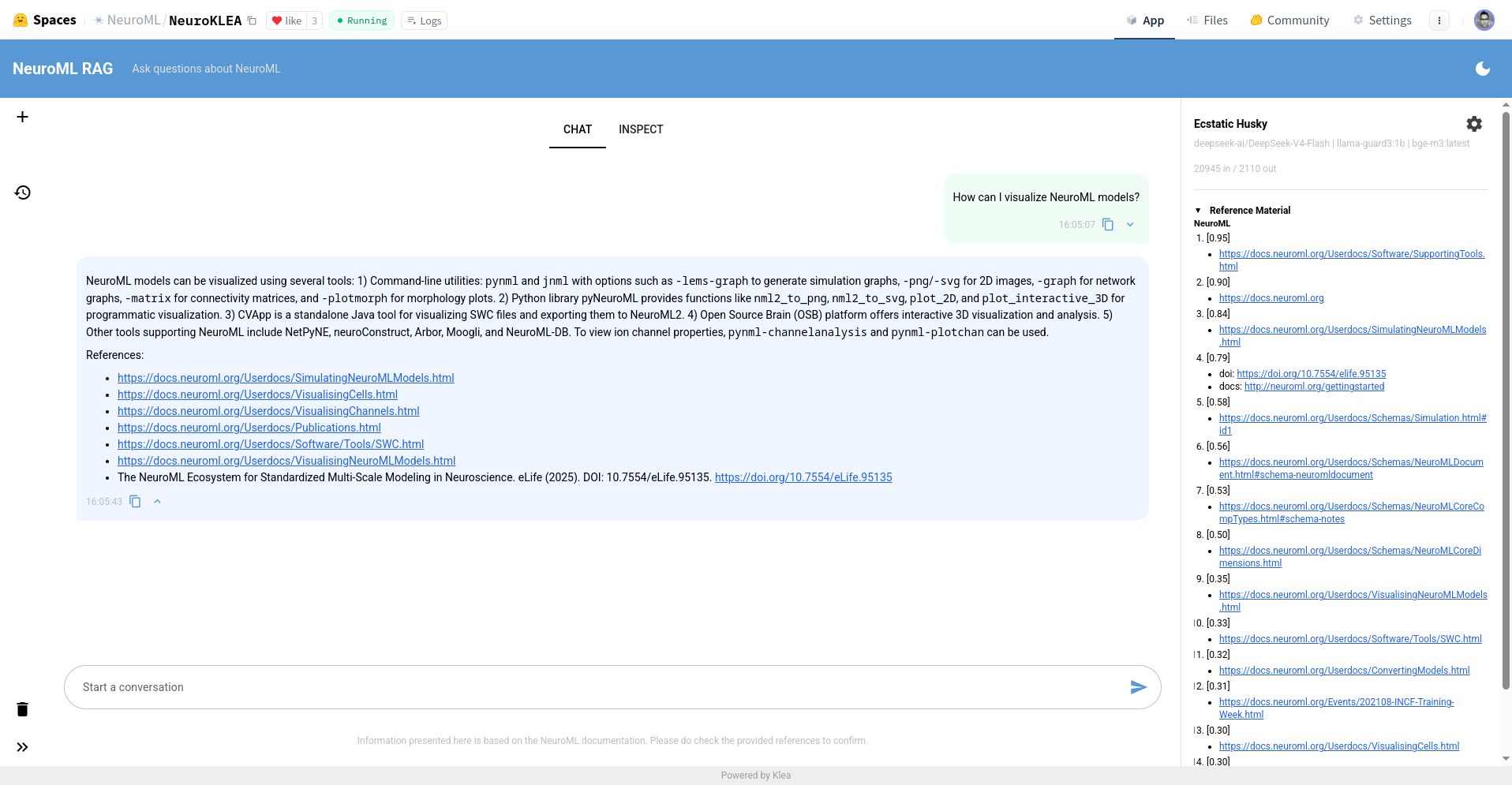
The new Klea RAG interface is divided into several components:
- the left side bar: for managing chats, deleting user data
- the main central panel: the chat and inspection views live here
- the right hand side bar for information and state updates: the top lists the model in use and so on, the bottom bit shows state updates sent by the graph nodes.
In this screenshot, one can see the chat view. I asked a question, and the system generated an answer, and listed references. These references are created from the curated documentation that was provided to the system in the vector stores. So, it is not hallucinated. The right hand pane lists all the documents that were referenced along with their scores.
Users can verify the information using the references and the referenced documents.
The top part of the right hand panel also allows users to change models as required. One can set default models, as I've done here, but users can then use their own models and API keys to use different models that they have access to.
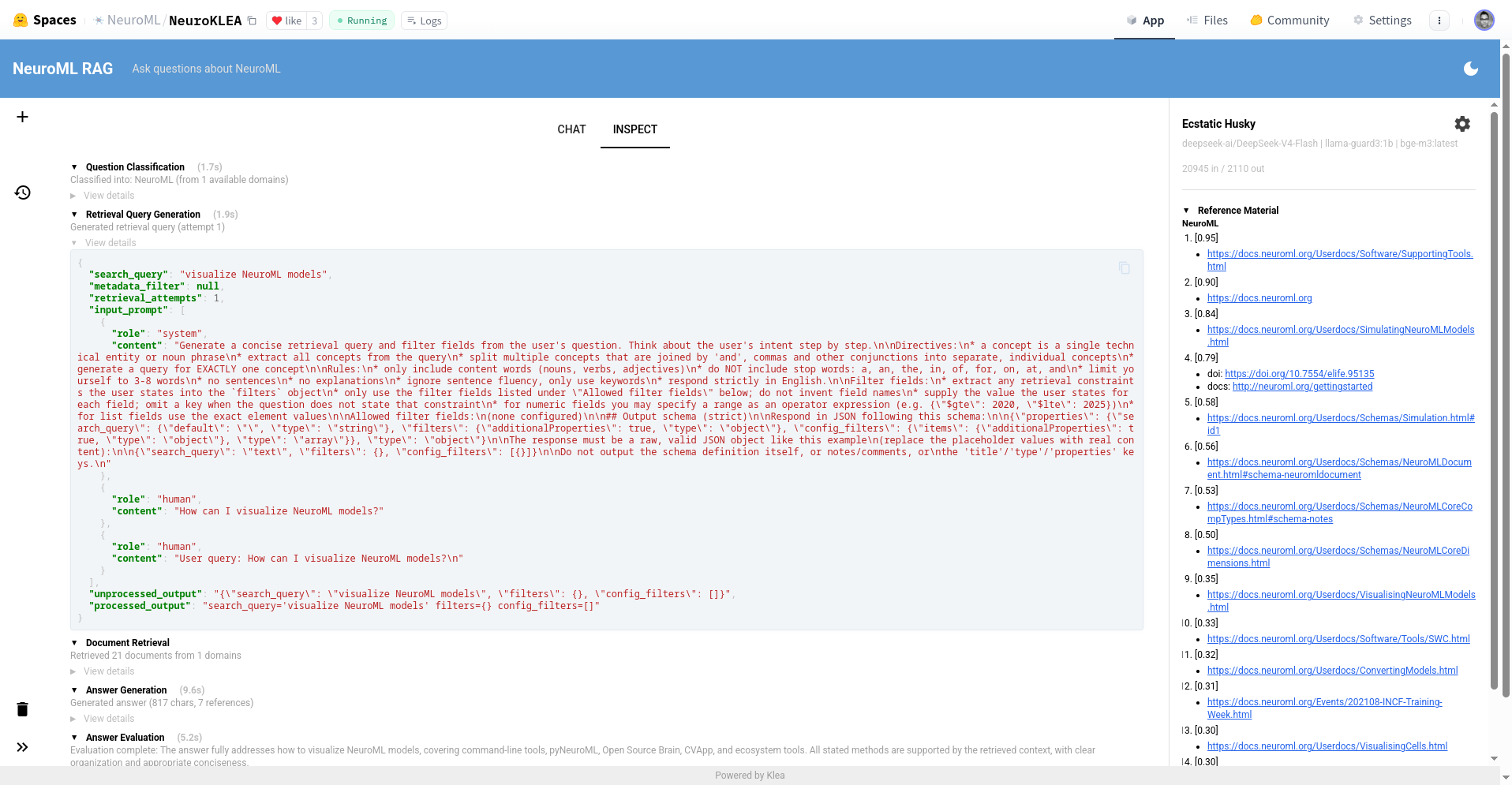
The next image shows the inspection pane. Here, one can review all the steps that system took to arrive at this answer, with the input/outputs, retrieved information, tool calls and so on. This is of great value---because it allows us to verify the results have greater confidence in the system's outputs.
I now have multiple deployments of the RAG on HuggingFace. One for NeuroML, one for Open Source Brain (this includes an MCP server to query a database of Open Source Brain repositories), and a third one for OpenWorm.
These are all containerised, and you will notice that they follow the same deployment pattern. You can clone one of these HuggingFace spaces and tweak the configuration to set up your personal deployment.
Note that you can also just use the RAG locally on your machine. It's designed to work for both use cases---local use and deployments. I tend to mostly use it locally.
Klea Agent
The agent is now a work in progress, with the RAG relatively stable. I still don't promise API compatibility though, since the general framework may change/evolve as we get feedback from our users. It'll follow the same framework, but we make some architectural decisions to make it "science worthy", because otherwise, why not just use an existing coding agent?
I'll write about this more in coming posts, but you can follow progress on the GitHub repository in the meantime. Klea has detailed documentation at https://neuroklea.org, and in the GitHub repository---ADRs, C4 diagrams, nodes, commented code. Please take a look and let me know what you think. Feedback is always welcome.
Comments